

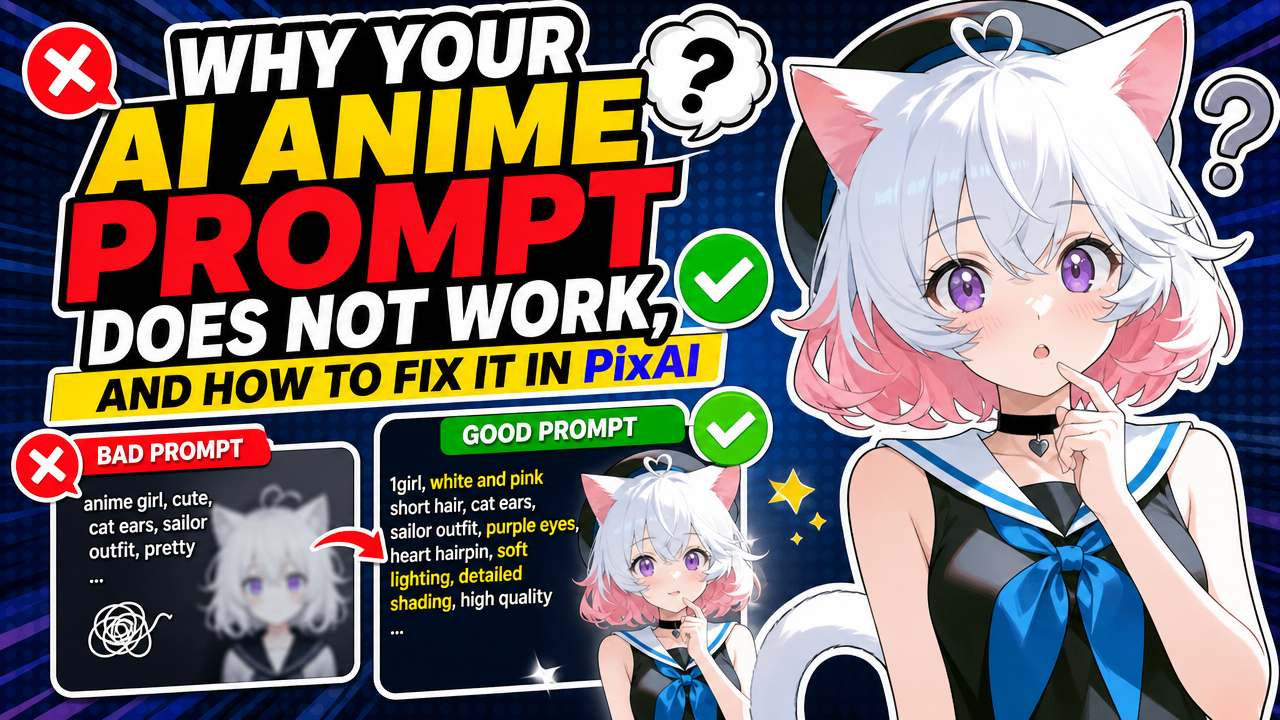
You typed exactly what you wanted. The AI gave you something else. Annoying, right?
Here’s the honest answer: it’s rarely because you “can’t prompt.” Most failed anime generations come down to one of four things. The prompt is vaguer than it feels in your head. The model you’re using has a style it quietly prefers over whatever you asked for. A LoRA is pulling in a different direction than your text.
Or you’re trying to describe something so specific that words were never going to carry it, and what you actually needed was a picture, not another sentence. Once you know which of those four you’re dealing with, the fix is usually fast. Guessing at all four at once is what burns an hour.
Common Prompt Problems in AI Anime Art
Let’s name the usual suspects, because half of troubleshooting is just recognizing the pattern.
You ask for lavender hair, you get plain purple. Close-ish, but not it. You spend a whole sentence on an outfit, a cropped hoodie, fingerless gloves, a belt with two buckles, and the generation keeps the hoodie and quietly forgets the gloves exist. Same story with props: “holding an umbrella” turns into empty hands more often than it should. Poses drift too. You write “kneeling, looking up, one hand on the ground” and get a character standing there like nothing happened.
Then there’s the one every OC creator has felt in their soul: you run the same character prompt five times, and you get five almost-right strangers. Right hair, right outfit, wrong person, every single time. And sometimes the trickiest failure is the sneaky one, an image that’s genuinely gorgeous, great lighting, clean composition, and just… not what you asked for at all. That one’s easy to miss because your brain wants to like it.
Why Adding More Words Does Not Always Fix the Prompt
The natural reaction to a bad generation is to bolt on more description. More adjectives, more clauses, more “no really, I mean THIS.” Sometimes that helps. A lot of the time it backfires.
Think of a prompt as a room full of people all talking at once, and the model is trying to figure out who to listen to. Every detail you add is another voice in that room. Add enough of them, especially ones that pull in slightly different directions (“delicate and ethereal” next to “battle-worn and gritty” in the same prompt), and the model starts blending them into something that satisfies neither.
There’s also a hierarchy of how “listenable” different details are. “Long dark hair” is an easy ask, the model has seen it a million times. A very specific, slightly unusual hair color with an exact undertone is a much harder ask, because there’s just less training data pointing at that exact thing, so the model defaults back toward what it knows.
Same goes for precise spatial relationships, an accessory positioned exactly here, a color pattern arranged in exactly this order. Language is a genuinely clumsy tool for that kind of precision, no matter how carefully you phrase it. That’s not a you problem. That’s where you stop rewriting and start reaching for a different tool entirely, like model choice or a reference image.
How Model Choice Changes Prompt Accuracy
Here’s something a lot of beginners don’t realize: the exact same prompt, word for word, can come out completely different depending on which model generates it.
Every anime-focused model has its own personality, for lack of a better word. Some default to soft, painterly shading. Some go hard on crisp cel-shading. Some have a “house face,” a face shape and eye style it gravitates toward no matter what you write, unless you actively fight it. Some handle busy, detailed outfits gracefully, others flatten them into something simpler. None of that is a bug exactly, it’s just what the model learned to lean on.
So if a prompt keeps failing the same way, generation after generation, that’s usually a signal to try a different model, not to keep rewording the same sentence. PixAI makes this pretty easy to test directly: run the same prompt across a few different anime-focused models and actually compare which one respects your character design or scene instead of quietly overriding it.
How LoRA Weight and Trigger Words Affect the Result
LoRAs are genuinely one of the most useful tools in anime generation, and also one of the easiest ways to accidentally sabotage yourself.
A LoRA nudges the base model toward a specific look, character, outfit, or style. How hard it nudges is controlled by a weight setting, and getting that number right matters more than most people expect. Weight too low, and the thing you added the LoRA for barely shows up, the base model’s own habits just steamroll it. Weight too high, and the LoRA can take over completely, sometimes producing weird artifacts or a character that looks subtly wrong in ways that are hard to describe.
Trigger words are the other trap. Plenty of LoRAs need a specific word or phrase to actually switch on. Forget it, and the LoRA might contribute almost nothing, no matter how good the rest of the prompt is. Stack a few LoRAs at once without thinking about it, and now you’ve got multiple influences quietly arguing with each other in the same image.
In PixAI, you can dial LoRA weight up or down directly and watch how the result shifts, rather than guessing blind and rerolling. If the relationship between models and LoRAs still feels fuzzy, PixAI’s breakdown of models versus LoRAs is worth a quick read before you start experimenting.
When to Use a Reference Image Instead of a Longer Prompt
Sometimes the fix isn’t a better sentence. It’s a picture.
There’s a category of detail text just isn’t built to carry: an exact face shape, a specific color relationship across three parts of an outfit, the precise way a character’s bangs fall, or “this OC, not just an OC that’s vibing in the same general style.” If you already have a design you’re trying to protect, or you’re trying to keep one face consistent across a dozen generations, a reference image will usually get you there faster than another paragraph of adjectives.
This is where OC creators and VTuber-style creators tend to feel the difference most. If your character keeps drifting between attempts, that’s often not a prompt-length problem, it’s that a text-only prompt has no memory of what “her” specifically looks like. It’s reconstructing her from scratch every single time. A reference gives the model something concrete to anchor to instead.
Worth saying plainly: a reference image improves control, it does not guarantee a perfect match. You’ll probably still tweak details afterward, especially for unusual poses or angles. But pairing a reference with a focused prompt, instead of leaning on either one alone, closes most of the gap that text-only generation struggles with.
A Practical PixAI Troubleshooting Workflow
Instead of mashing generate and hoping the next roll is luckier, work through it in order:
- Lead with what matters. Put your two or three most important details first, hair color, key outfit piece, pose, rather than burying them in a wall of text.
- Generate, then actually diagnose. Don’t just feel vaguely disappointed, name the specific failure: wrong color, missing prop, wrong pose.
- Cut before you add. If something’s not showing up, try trimming competing details before piling on more.
- Test the model. Same failure showing up repeatedly? Try a different anime-focused model in PixAI before touching the wording again.
- Check LoRA weight and trigger words. Confirm the trigger word is actually in the prompt, and nudge the weight up or down until the effect appears without taking over.
- Bring in a reference image once you’re chasing a specific character or visual consistency rather than a general vibe.
- Edit instead of restarting. If 90% of the image is right and only the eyes or an accessory are wrong, fix that part rather than regenerating everything.
- Compare, don’t rely on memory. Keep the earlier attempt visible next to the new one so you can actually see whether the change worked.
If you’re brand new to any of these controls, PixAI’s getting started guide walks through the interface basics first.
Before and After Examples
1. Wrong hair color. Prompt: “girl with lavender hair, gold eyes, casual outfit.” Result: plain purple instead of lavender. Fix: switched to a model with a lighter, pastel-leaning default palette and moved “lavender hair” to the front of the prompt. Result: color landed correctly.
2. Missing outfit detail. Prompt: “cropped hoodie, fingerless gloves, belt with two buckles, standing casually.” Result: hoodie present, gloves and belt buckles both missing. Fix: trimmed the prompt to focus on gloves and buckles specifically, then added a reference image of the outfit. Result: both details showed up clearly.
3. Inconsistent OC face. Same character description run five times. Result: five different faces, similar vibe, wrong person each time. Fix: added a reference image and locked in the same model and settings across attempts. Result: facial structure held together noticeably better, with only minor drift at unusual angles.
4. LoRA doing nothing. A style LoRA was applied at low weight with no trigger word included. Result: image basically ignored it, looked like the base model’s default. Fix: added the correct trigger word and raised the weight step by step. Result: the intended style became clearly visible without swallowing the rest of the image.
5. Pose not matching. Prompt: “kneeling, looking up, one hand on the ground.” Result: standing pose, no kneel in sight. Fix: stripped the sentence down to just pose and expression, moved outfit details to a separate pass, and tried a model with a stronger track record on pose adherence. Result: pose matched on the next try.
6. Technically good, wrong idea entirely. Prompt described a rainy neon-lit alley at night. Result: clean, well-lit daytime scene, nice image, wrong mood completely. Fix: moved lighting and time of day to the very front of the prompt instead of the end, and checked that the chosen model was known for handling moody lighting well. Result: the neon night atmosphere came through as intended.
Prompt Troubleshooting Checklist
Quick pass before you hit generate again:
- Any details in the prompt quietly contradicting each other?
- Is the most important detail actually first in the sentence?
- Have you tried a different anime-focused model yet?
- If you’re using a LoRA, is the trigger word actually in there?
- Could the LoRA weight be too low or too high?
- Would a reference image explain this better than more words?
- Does the whole image need regenerating, or just one part of it?
- Are you comparing this attempt to the last one side by side, or just going off memory?
Final Thoughts
A prompt that keeps failing usually isn’t telling you to write better sentences. It’s telling you that one specific piece, the wording, the model, the LoRA weight, or a missing reference, needs adjusting, and figuring out which one is most of the actual work.
PixAI gives you the pieces to run that diagnosis instead of guessing: several anime-focused models to test side by side, LoRA weight and trigger word controls you can actually see the effect of, reference-based generation for character consistency, and editing tools for fixing just the part that’s broken instead of starting over.
None of that promises a perfect result on the first try, and honestly, it shouldn’t claim to. What it does is turn “why doesn’t this work” into a short list of things you can actually check. Next time a generation misses, run through the steps above in PixAI before you rewrite the whole prompt from zero.









Discussion about this post