



Did you know most buyers check online reviews before deciding who to trust?
If you run a small business, that means every review — and how you respond — shapes your reputation. A few lines can either build trust or break it.
Here’s the good news: you control how you respond.
With the right approach, you can turn any review (yes, even a one-star review!) into an opportunity to win customers over and encourage them to come back for more.
In this article, we’ll cover:
- How to respond to customer reviews the right way
- How to train your staff to do the same
- How to choose the right tools to use
- How to measure the effectiveness of your strategy
Why Reviews Matter More Than Ever
These days, customers don’t just take note of your overall star rating. They also read your responses to reviews.
A personal, thoughtful response shows that you value your customers and care about their experience. A defensive response or no response at all gives the opposite impression.
Search engines like Google and Yelp favor businesses that engage with their customers by responding to reviews on a regular basis. This helps to increase the visibility of your business in local search results and makes you seem like a more trustworthy option to potential customers.
For example, a local coffee shop committed to responding to every review within 24 hours. As a result, they started to see an increase in the number of repeat customers!
By responding to reviews on a consistent basis, you’re showing your customers (and search engines) that you’re an active, reliable, and customer-centric business.
Every customer review is an opportunity to show the world what your business is all about.
Every review is a chance to show what your business stands for.
Step 1: Read Before You React
Negative reviews can be tough to swallow. But responding in the heat of the moment can do more harm than good.
When you see a negative review pop up, take a minute to breathe before responding. I recommend counting to 60–90 seconds before responding to any review.
- What actually happened?
- Is the feedback fair?
- Can I fix this?
Responding with a calm, professional tone makes you look confident and accountable — exactly what customers want to see.
Step 2: Thank the Reviewer (Even When It Hurts)
Always start your response with a “thank you” — even if the review is negative.
Example (for a late delivery):
Thank you for your feedback. We understand your frustration about the delay and sincerely apologize for the inconvenience. We’re reviewing our delivery process to prevent this from happening again and have expedited your current order to ensure it arrives as soon as possible.
This will show your customers that you respect what they have to say — even if you can’t give them what they want.
Step 3: Address the Issue Directly
Don’t dodge the problem. Acknowledge it, clarify briefly, and explain what you’re doing to fix it.
Example (service complaint):
We understand your frustration about the wait time. We’ve added weekend staff to improve scheduling and reduce delays.
Avoid vague replies like “Sorry you feel that way.”
Be factual, direct, and proactive — it’s what customers remember most.
Step 4: Move the Conversation Offline
You want to keep your public response brief and professional.
Instead, invite the customer to continue the conversation with you privately.
Example:
Please reach out to us at [email address] so we can resolve this quickly.
Private conversations help you fix issues faster and avoid public back-and-forths. Once the problem is solved, politely ask if they’d consider updating their review — many customers will.
Step 5: Respond to Positive Reviews Too
Don’t ignore happy customers. They’re your best marketing asset.
Example:
We’re thrilled you loved your visit! Thanks for mentioning our new menu — we’ll share your feedback with the team.
To make your response more personal, try to reference something specific that they mentioned in their review.
You can also ask light follow-ups like:
“What made the experience stand out for you?”
That small question invites engagement — and richer feedback you can use later.
Handling Tricky Reviews (with Examples)
We know that some reviews are easier to respond to than others.
Here are a few examples of tough reviews and how you might respond to them:
When the customer is wrong:
We’re sorry for any confusion. It looks like your order was placed under a different name. Please reach out so we can clear this up right away.
When the review is fake:
We couldn’t find a record of your visit, but we’d love to learn more. Please contact us directly so we can investigate further.
When they complain publicly but praise privately:
We appreciate your kind words in our private message and are glad we could resolve your concern. Thank you for giving us the chance to make it right.
The key is to always keep a level head and never take a bad review personally.
You can’t control how customers behave on the Internet, but you can control how you respond to them.
So always keep a cool head and never engage with someone who is being irrational or abusive. This will only reflect poorly on your business.
Instead, kill customers with kindness and rise above the drama.
Step 6: Keep Responses Consistent Across Your Team
If multiple team members reply to reviews, consistency is key. Customers should feel like they’re hearing one brand voice.
Create a simple playbook:
- Templates for positive, neutral, and negative reviews.
- Defined tone (friendly, calm, professional).
- Role-play practice sessions.
- Approval process for tricky reviews.
Store templates in a shared Google Doc or Notion file so everyone replies faster and stays aligned.
Tools to Help You Manage Reviews
You don’t have to manage everything manually.
Here are tools that make it easier — whether you run one location or several.
| Tool | Best For | Pros | Cons |
| NewReputation | Small businesses needing quick, polished replies | Easy to use, generates on-brand responses | Limited deep analytics |
| Podium | Teams managing text + review communication | Central dashboard, great for local messaging | Higher cost for smaller teams |
| Birdeye | Multi-location or franchise operations | Strong analytics, great for monitoring at scale | Setup takes time |
| Grade.us | Agencies or service pros collecting reviews | Automates review follow-ups and requests | Older interface design |
When comparing, look for:
- Ease of connecting with Google and Yelp
- Customizable tone options
- Built-in analytics to track sentiment trends
Start simple with NewReputation — it’s beginner-friendly and helps you respond faster while maintaining your tone.
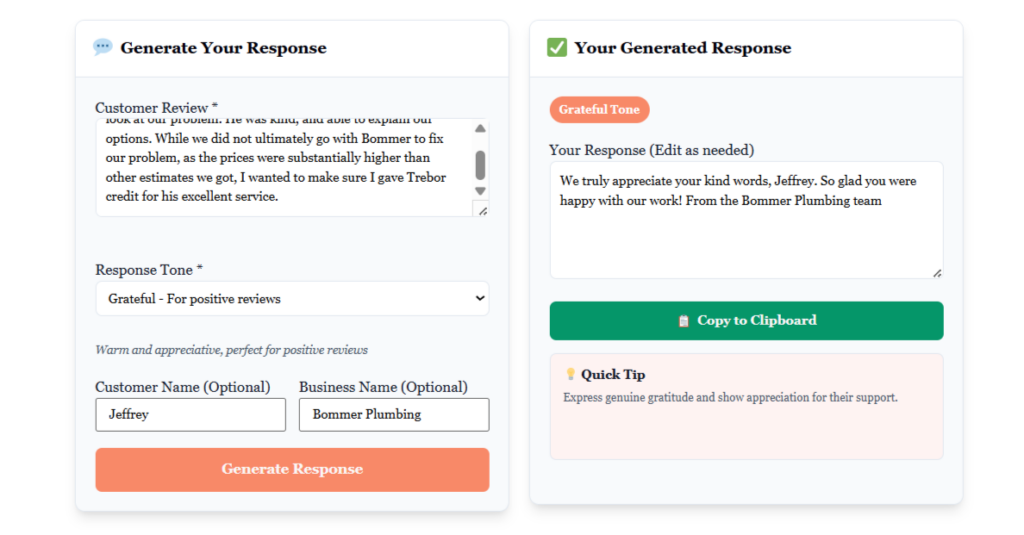
Reference: NewReputation Review Response Generator
Step 7: Measure Your Results
You can’t improve what you don’t measure.
Track these metrics every 90 days:
- Rating: Are you getting higher?
- Response time: Are you getting quicker?
- Visibility: Are you getting higher in the search results?
- Customer retention: Are more customers coming back after a review?
Even small improvements — like replying faster — can lead to noticeable increases in loyalty and conversions over time.
Step 8: Keep the Momentum Going
Reputation management is not a project; it’s a practice.
- Check reviews weekly.
- Update templates monthly.
- Review metrics quarterly.
You don’t need to be perfect. You just need to be present.
Customers forgive mistakes — they don’t forgive silence.
Final Thoughts
You can’t stop people from leaving reviews.
But you can control how your business shows up when they do.
Every review is a public handshake.
How you respond defines whether that handshake builds trust — or breaks it.
Whether you use NewReputation, Podium, Birdeye, Grade.us or any other platform, the objective is the same:
- Be responsive
- Be human
- Be consistent
By mastering review responses, you’re not defending your reputation, you’re building it.










Discussion about this post